
Technical note
Firmware OTA for a consumer device you already ship
The first factory image is a beginning. The update you send a year later is the product. Design that path as if you cannot hold the unit.
A consumer device you already ship is a worse OTA problem than a prototype. The flash map is frozen. The battery curve is the one in the field, not the one on the bench. The user will pull power. The radio will drop. A fraction of units will be on an image you no longer have a board for. None of that is theoretical. It is the job.
This note is firmware practice for that job. It is not a protocol standard, and it is not a vendor application note rewritten. It assumes you own the microcontroller and the update channel — USB, BLE, Wi-Fi, or a dock — and that you cannot change the hardware to make the software easier.
Write the failure list first
Before you pick A/B slots or a recovery partition, write down what must not happen. The unit must still boot a known image if the new one is incomplete. The unit must not apply a package that fails a signature or a length check. The unit must not sit forever in a downloader because a confirm never arrived. The unit must have a story when flash writes are interrupted. If you cannot say those sentences, you do not have an OTA design. You have a file copy.
Add the product-specific failures. A battery below a threshold. A dock that can supply current the battery cannot. A BLE link that will not hold a multi-megabyte transfer without a resume. A user who installs from a phone and then force-quits the app. Each one is a state you have to name in firmware, not a support article.
Slots, not vibes
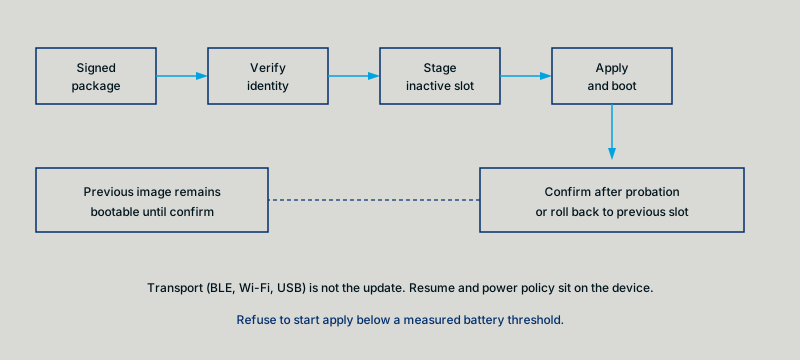
The usual patterns are dual-bank (A/B), a dedicated recovery image plus a single application slot, or a factory partition that can re-seed the rest. Dual-bank is the easiest story to tell: you write the inactive slot, you switch, you confirm, you keep the previous slot until you confirm. It costs flash. If you do not have the flash, say so, and then the recovery image has to be small, trusted, and able to pull a full image by a channel that still works when the application is trash.
Single-slot update with no recovery is not a pattern. It is a way to brick a SKU. If someone proposes it to save fifty cents of flash, the conversation is a product conversation, not a firmware optimization. Write the brick rate they are accepting.
Whatever you pick, the bootloader — or the first-stage that cannot be updated casually — must know which slot is current, which slot is staged, and what “confirmed” means. That metadata wants its own small, wear-aware home. Do not hide it in a structure you also use for user settings.
Signature and identity
Sign the package. Verify on the device before you erase anything you care about. Include a product identity so an image for a sibling SKU cannot apply. Include a version that the device can reject as a downgrade if you do not want downgrades, or accept if you do. Those are product rules. Firmware should implement the rule, not invent it on the call.
Key handling is part of the design. Who can sign. Where the public key lives. What happens when you need to rotate. If the answer is “the one key in the first commit,” write that down as a risk. You do not need a public-key infrastructure lecture. You need a sentence about who holds the signer and how a replacement key gets onto units that already shipped.
Transport is not the update
BLE, Wi-Fi, USB, and a factory jig are transports. They all drop. Resume must be a property of the package and the device, not of the phone app’s optimism. A length, an offset, and a checksum per chunk will save more field units than a faster advertised throughput.
If the transport is BLE GATT, do not invent a new world. Use a control point and a data path you can document in one page. Cap the payload to a size you have measured on the worst phone you care about. Notifications are not a delivery guarantee. If the firmware cannot afford a lost chunk, it must ask again.
Apply, confirm, roll back
Apply is the dangerous hour. Power policy belongs here: refuse to start if the battery is below the threshold you measured, not the threshold that looked fine in a slide. After apply, boot the new image into a probation you can survive. Confirm only after the new image has shown the few things that mean “this is still the product” — audio path up, display up, radio up, whatever the device is. If confirm does not happen, the next boot returns to the previous slot. That return is a success of the design, not a failure of the release.
Log enough to diagnose a failed update without a debugger on the kitchen table. A reason code you can collect from a later successful connection is worth more than a verbose log you cannot retrieve. Be careful what you store. You are still on a consumer device.
Staging a fleet
A shipped product is a fleet even when you are small. Ring the update: internal units, then a small field slice, then the rest. The firmware should tolerate being on N versions. The release notes should say which old versions can jump to this one. If they cannot, say the stepping stone. Silent “everyone is on latest” is how you discover a brick in a region you cannot visit.
Compatibility with accessories and companion software is part of the same ring. An OTA that fixes a hiss and breaks last year’s app is not a successful firmware release. Version the protocol. Keep a window.
What this is not
This is not hardware revision. If the flash is too small for a safe layout, that is a product decision you can escalate. It is not a firmware trick. This is not a cloud platform. You can host packages on anything you already operate. The device must not care.
ASHNAY SOFTWARE writes this class of firmware. We do not sell the device. The principal has shipped OTA, BLE GATT, and power-management firmware on consumer audio; that program is his prior work, anonymized on the Work pages. This note is the public method, without employer internals.